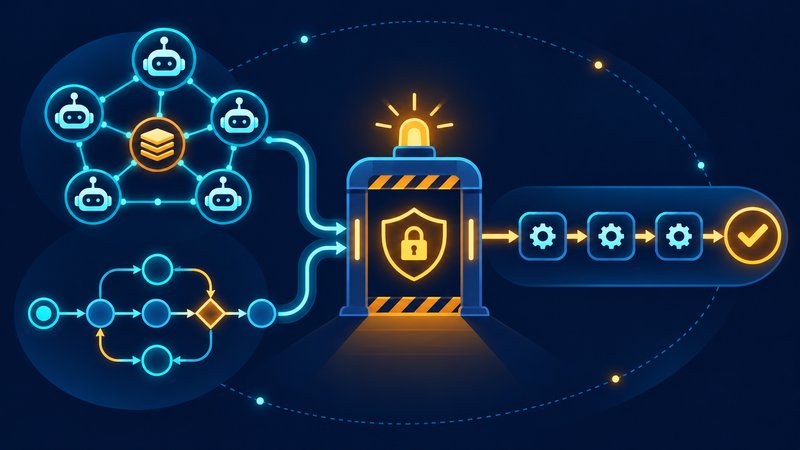
Agentic multi-agent orchestration is how modern teams move from “one chat prompt that writes everything” to a system that plans steps, uses tools, and runs tasks safely.
In this guide, you’ll learn what agentic multi-agent orchestration really means in practice, why tool calling keeps failing when teams skip state control, and how structured workflows like state machines and typed execution loops reduce chaos. This is not theory for a slide deck. It’s the stuff people trip over in real deployments, especially when agents interact with legacy software or do multi-step work.
If you’ve noticed that agents sometimes “hallucinate tool outputs”, or they keep mixing instructions from different tasks, you’re seeing the exact pain point that agentic multi-agent orchestration is built to fix. And yes, it also explains why teams are moving away from fragile prompt chaining.
What “Agentic Multi-Agent Orchestration” Actually Means
Agentic multi-agent orchestration is the move toward systems where:
- Multiple agents each have a job (like planning, searching, executing, reviewing).
- A router or manager decides which agent runs next.
- The system uses tools (web search, databases, file readers, code runners).
- A state machine tracks what’s done, what’s next, and what must be approved.
Here’s the key idea. A chat model can reply fluently, but it does not automatically manage process state. It also doesn’t naturally know which step counts as “done” versus “still in progress.” That’s why orchestration exists.
Why a single agent and one long prompt often fails
A single “do-it-all prompt” breaks down when:
- Instructions collide across steps.
- Context grows and gets mixed (the system starts responding to the wrong part).
- Tools fail, but the agent keeps going as if they worked.
- No one blocks high-risk actions (like payments or code changes).
Recent enterprise writeups and framework guidance point to this exact limitation. Teams increasingly split work into smaller squads and use structured workflows instead of unstructured prompt chains.
You’ll see the same direction in modern frameworks mentioned in your research list, like LangGraph (stateful orchestration), and agent-first SDKs like PydanticAI and Mastra (typed loops).
The Real Problem: Tool Calling Needs State, Not Hope
Tool calling sounds simple: agent says “call tool X”, tool runs, agent reads result. But the reality is messier.
The tool calling failure modes I see most
- The agent misformats the call
- It sends prose instead of the exact JSON schema.
- The tool output is partially read
- The agent treats only the first line as “the whole result.”
- The agent continues after a failed tool call
- Example: database query errors, but the agent moves on.
- The agent re-asks the same question in a loop
- This happens when the system has no “step done” state.
- The agent mixes instructions from different objectives
- It might combine “summarize policy” with “draft email” because both were in context.
Agentic multi-agent orchestration helps because it forces structure:
- Each step updates a state variable.
- The next agent is chosen based on that state.
- Failures route to a “repair” agent or a fallback path.
Typed tool loops reduce parsing mistakes
Framework ecosystems are trending toward typed SDKs and structured state machines. Instead of “hope the model sends correct tool syntax,” they validate inputs and outputs with schemas.
That’s one reason many teams move from prompt-chaining to graph-based execution. LangGraph is commonly cited for controlling states, fallbacks, and human approval loops.
Reference:
- LangGraph direction is covered in LangChain’s ecosystem overview and related docs: https://langchain.com
Router-First Systems: Plan, Decide, Then Act
Most production orchestration starts with routing. Not every request needs the same agents or tools.
Router agents pick the right squad
In router-first designs, the system decides:
- Is the user asking for research or execution?
- Is it low-risk or high-risk?
- Does it need file analysis or web grounding?
- Does it require human approval?
Your search results also mention “USB-C of AI connectivity” ideas like MCP, which is used to connect agents and tools across models and apps. Even if you don’t adopt MCP, the lesson is the same: tool availability and tool contracts matter a lot.
Reference for MCP idea:
- https://www.anthropic.com/news/model-context-protocol-mcp (official concept page, for background)
And frameworks that emphasize “structured state machines and typed SDKs” are trending across enterprise stacks, as your research summary notes.
A simple router pattern that works
You can implement a practical router like this:
- Classify intent
- Research, write, execute, triage, summarize, convert, etc.
- Select agent team
- Research agent(s), execution agent, reviewer agent.
- Assign tools
- Search tool, database tool, internal API tool, file tool.
- Set risk policy
- Require approval for payments, refunds, account changes, or sending emails.
- Run through a state graph
- Track step transitions and tool results.
This is the “agent squad meets execution loop” approach that shows up repeatedly in modern orchestration discussions.
State Machines Beat Prompt Chaining (Here’s Why)
Prompt chaining is where you keep feeding one model’s output into the next prompt. It’s quick to build. It’s also where hidden failures pile up.
What state machines add
In agentic multi-agent orchestration, state machines give you:
- Clear step boundaries
- Retry rules per step
- Fallback paths
- Human checkpoints
- Logging for debugging
This lines up with the trend toward graph-based orchestration frameworks like LangGraph and more structured enterprise agent frameworks.
Reference direction:
- LangGraph: https://langchain.com (LangChain ecosystem pages also cover it)
A “human approval” gate is not optional for risky actions
Your search results mention that “unmonitored autonomy has been replaced by gated permissions” and “interrupt checkpoints” where the agent pauses for approval via Slack or a dashboard.
In practice, that means:
- The agent proposes an action.
- The system verifies it against policy and permissions.
- The system pauses.
- A human approves or rejects.
- Only then does the tool run.
This is one of the best ways to reduce catastrophic mistakes.
Multi-Agent Teams That Actually Make Sense
Multi-agent orchestration works best when each agent has a narrow job.
A practical 4-agent squad
Here’s a simple pattern that covers a lot of use cases:
- Planner agent
- Breaks the task into steps.
- Produces a step checklist.
- Tool executor agent
- Calls tools for each step.
- Captures outputs in structured form.
- Critic or verifier agent
- Validates results.
- Checks if facts match tool outputs.
- Finalizer agent
- Produces the final user-facing output.
- Ensures the output matches the requested format.
When tasks are narrow, fewer instructions collide.
Your research results also mention that leading architectures break tasks down into specialized multi-agent squads, specifically because “context pollution” degrades reasoning and multi-step tasks fail when instructions collide.
Reference examples of this design trend show up across agent frameworks:
- PydanticAI / Mastra is referenced in your search results as developer-first typed approaches: https://mastra.ai
A Deployment Blueprint: Build One Orchestration System End-to-End
Let’s map out a real build path for agentic multi-agent orchestration.
Step 1: Define state and step transitions
Start with a minimal graph:
RECEIVE_INPUTROUTE_TASKPLAN_STEPSEXECUTE_STEPVERIFY_RESULTSREQUEST_APPROVAL_IF_NEEDEDFINALIZE_OUTPUTDONE
At each transition, store:
- user intent
- required tools
- tool call results
- risk level
- approval status
This is the backbone of agentic multi-agent orchestration.
Step 2: Add tool contracts with schemas
For each tool, define:
- input schema (what fields are required)
- output schema (what fields will come back)
- error schema (how to detect failure cleanly)
Typed schemas reduce “model guessing” behavior. This also helps you log tool failures and trace them.
Step 3: Add retries, not random second chances
If tool step fails:
- Retry only the specific call.
- If it fails again, route to a repair agent.
- If it still fails, stop and ask for user input.
This is where state machines win. You decide the rule once, not every conversation.
Step 4: Add an approval checkpoint for high-risk actions
High risk usually includes:
- payments and refunds
- account changes
- sending emails that represent your company
- database row modifications
Your research list explicitly mentions gated permissions and interrupt checkpoints, which is exactly what to apply here.
Enterprise Reality: Legacy Systems and Desktop Automation
A big part of “agentic orchestration” today is not just API calls. It’s dealing with systems that were never designed for modern agent tool use.
Your search results mention RPA plus cognitive planning for legacy desktop software and ERPs, where agents navigate existing UI flows.
How orchestation helps in UI-driven systems
When the “tool” is not an API call but “click a sequence in a desktop app,” you need:
- strict action steps
- step-by-step state logs
- retries based on UI element availability
- approval checkpoints for risky operations
This is where deterministic execution loops and structured states matter.
The main point: orchestration is not just for speed. It’s also for control.
How to Evaluate Orchestration (Without Guessing Blind)
If you run agentic multi-agent orchestration in production, you need measurement. Not “vibes.”
Your research results mention offline evals and tracing tools like LangSmith, Promptfoo, and Arize, where you track reasoning trees, tool errors, and token leakage.

What you should track in orchestration evals
- Tool success rate per tool
- Schema validation failures
- Average number of step retries
- Verification failures
- Human approval frequency
- Time-to-final output
- Hallucinated tool output rate (cases where final answer doesn’t match tool output)
This evaluation approach will tell you whether your orchestration is improving or just changing failure shapes.
Reference:
- Your research list: LangSmith, Promptfoo, Arize are called out under offline eval and tracing.
Where “MCP” and Tool Connectivity Fit
Model Context Protocol (MCP) is discussed in your search results as a plug-and-play standard, called a “USB-C of AI connectivity.”
Even if you don’t implement MCP immediately, the idea helps you design your system better:
- tools should have stable interfaces
- agents should be able to swap models without rewriting everything
- tool access should be permissioned and logged
Reference from your list:
- https://ifourtechnolab.com (summary article referencing MCP concept)
Common Mistakes to Avoid When Building Agentic Multi-Agent Orchestration
Mistake 1: You treat orchestration like prompt engineering
If the only “structure” is more prompts, you’ll still get inconsistent tool calls.
Fix: use state machines and typed tool schemas.
Mistake 2: You don’t separate “planning” and “execution”
Planning should not run the real tools. Execution agents should.
Fix: allocate responsibilities to agents.
Mistake 3: No verification step
If nothing checks results, tool failures become user-facing wrong answers.
Fix: include a verifier agent or a verification policy.
Mistake 4: You give too much permission to the agent
Your search results mention gated permissions as the answer to unmonitored autonomy.
Fix: require approval for risky steps and use scoped permissions for everything else.
How Neura Thinks About This (Practical Product Fit)
Agentic multi-agent orchestration is also what modern “agent platforms” are trying to operationalize. In product terms, the key is routing and action loops, not just text generation.
Neura’s ecosystem describes AI-powered Router Agents (RAG + Reasoning, Decision and Action) and multiple capabilities like transcription, document analysis, website support, and task automation.
If you want to see how orchestration turns into apps and real workflows, you can start here:
- https://meetneura.ai
- Product overview: https://meetneura.ai/products
- Case studies: https://blog.meetneura.ai/#case-studies
- Example: FineryMarkets case study: https://blog.meetneura.ai/case-study-finerymarkets-com/
This isn’t about forcing a single architecture on every team. But it is about building the same idea: route correctly, call the right tool, and keep the workflow controlled.
Quick Checklist: Your First Working Orchestration in 7 Decisions
If you want agentic multi-agent orchestration to work reliably, decide these:
- What are your top 5 user intents?
- Which tools map to each intent?
- Which agent handles planning versus execution?
- What are your state steps?
- What must be verified before responding?
- What steps need approval?
- How will you trace tool errors and schema failures?
Nail those, and you’ll avoid the most common failure patterns.
Conclusion: Agentic Multi-Agent Orchestration Is About Control, Not Magic
Agentic multi-agent orchestration is the shift from “clever chat” to controlled execution. It reduces context chaos, makes tool calling more reliable, and adds guardrails for risky actions.
If you’re building or improving an agent system this year, focus on state machines, typed tool schemas, router logic, evaluation with tracing, and gated permissions. That combination is what turns agents from demos into something you can trust.